library(tidyverse)STA5092Z EDA Lecture 7-8
Tidy Datasets
“Happy families are all alike; every unhappy family is unhappy in its own way.” L.Tolstoy - Anna Karenina
Like families, tidy datasets are all alike but every messy dataset is messy in its own way. A dataset is messy or tidy depending on how rows, columns and tables are matched up with observations, variables and types. In tidy data:
Each variable must have its own column.
Each observation must have its own row.
Each value must have its own cell.
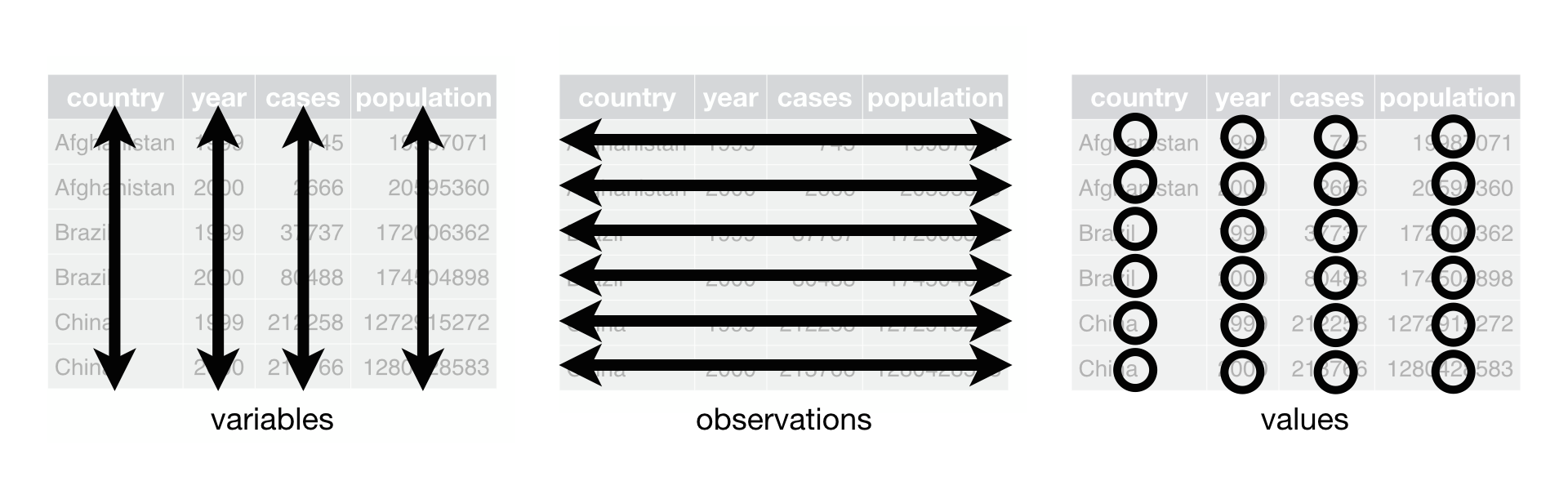
Ref: https://r4ds.had.co.nz/tidy-data.html
Why do we need tidy data?
Tidy datasets are all alike but every messy dataset is messy in its own way.
This clearly states that:
There is uniformity
R works in vectorised nature.
Are we ever going to work with untidy datasets? Answer is all the time… What type of issues can we have with untidy datasets?
- One variable might be spread across multiple columns.
- One observation might be spread across multiple rows.
treatmentdata <- tibble(
  person = c("JS", "JD", "MJ"),
  treatmenta = as.numeric(c(NaN, 16,3)),
  treatmentb = c(12,11,1)
  )
treatmentdata |> kableExtra::kable()| person | treatmenta | treatmentb |
|---|---|---|
| JS | NaN | 12 |
| JD | 16 | 11 |
| MJ | 3 | 1 |
Table 2 shows the same data as Table 1, but the rows and columns have been transposed. The data is the same, but the layout is different.
| person | JS | JD | MJ |
| treatmenta | NA | 16 | 3 |
| treatmentb | 12 | 11 | 1 |
Reorganised dataset
Table 3 is the tidy version of Table 1. Each row represents an observation, the result of one treatment on one person, and each column is a variable. We will see how we can obtain this tidy dataset in R.
| person | treatment | cases |
|---|---|---|
| JS | treatmenta | NaN |
| JS | treatmentb | 12 |
| JD | treatmenta | 16 |
| JD | treatmentb | 11 |
| MJ | treatmenta | 3 |
| MJ | treatmentb | 1 |
Tidying messy datasets
Most common problems with messy datasets are
Column headers are values, not variable names.
One variable might be spread across multiple columns.
A single observational unit might be scattered across multiple rows.
Multiple variables are stored in one column.
Variables are stored in both rows and columns.
Multiple types of observational units are stored in the same table.
To fix these problems, you’ll need the two most important functions in tidyr: pivot_longer() and pivot_wider()
pivot_longer() table4a
pivot_longer() makes datasets longer by increasing the number of rows and decreasing the number of columns.
- Column headers are values, not variable names.
- One variable might be spread across multiple columns.
table4a# A tibble: 3 × 3
country `1999` `2000`
<chr> <dbl> <dbl>
1 Afghanistan 745 2666
2 Brazil 37737 80488
3 China 212258 213766tidy4a <- table4a |>
pivot_longer(c('1999', '2000'),
names_to = "year",
values_to = "cases")pivot_longer() table4b
table4b# A tibble: 3 × 3
country `1999` `2000`
<chr> <dbl> <dbl>
1 Afghanistan 19987071 20595360
2 Brazil 172006362 174504898
3 China 1272915272 1280428583tidy4b <- table4b |>
pivot_longer(c('1999', '2000'),
names_to = "year",
values_to = "population")pivot_longer() tidy4a and tidy4b
tidy4a# A tibble: 6 × 3
country year cases
<chr> <chr> <dbl>
1 Afghanistan 1999 745
2 Afghanistan 2000 2666
3 Brazil 1999 37737
4 Brazil 2000 80488
5 China 1999 212258
6 China 2000 213766tidy4b# A tibble: 6 × 3
country year population
<chr> <chr> <dbl>
1 Afghanistan 1999 19987071
2 Afghanistan 2000 20595360
3 Brazil 1999 172006362
4 Brazil 2000 174504898
5 China 1999 1272915272
6 China 2000 1280428583full_join()
full_join(tidy4a, tidy4b)Joining with `by = join_by(country, year)`# A tibble: 6 × 4
country year cases population
<chr> <chr> <dbl> <dbl>
1 Afghanistan 1999 745 19987071
2 Afghanistan 2000 2666 20595360
3 Brazil 1999 37737 172006362
4 Brazil 2000 80488 174504898
5 China 1999 212258 1272915272
6 China 2000 213766 1280428583pivot_wider() table2
- A single observational unit might be scattered across multiple rows
table2# A tibble: 12 × 4
country year type count
<chr> <dbl> <chr> <dbl>
1 Afghanistan 1999 cases 745
2 Afghanistan 1999 population 19987071
3 Afghanistan 2000 cases 2666
4 Afghanistan 2000 population 20595360
5 Brazil 1999 cases 37737
6 Brazil 1999 population 172006362
7 Brazil 2000 cases 80488
8 Brazil 2000 population 174504898
9 China 1999 cases 212258
10 China 1999 population 1272915272
11 China 2000 cases 213766
12 China 2000 population 1280428583pivot_wider()
We need to tell R from which column the variable names are coming from.
We also need to tell R from which column the variable values are coming from.
For more examples and explanation see
vignette("pivot")
table2 |>
  pivot_wider(names_from = type,
              values_from = count)
# A tibble: 6 × 4
country year cases population
<chr> <dbl> <dbl> <dbl>
1 Afghanistan 1999 745 19987071
2 Afghanistan 2000 2666 20595360
3 Brazil 1999 37737 172006362
4 Brazil 2000 80488 174504898
5 China 1999 212258 1272915272
6 China 2000 213766 1280428583separate()
- Multiple variables are stored in one column.
table3# A tibble: 6 × 3
country year rate
<chr> <dbl> <chr>
1 Afghanistan 1999 745/19987071
2 Afghanistan 2000 2666/20595360
3 Brazil 1999 37737/172006362
4 Brazil 2000 80488/174504898
5 China 1999 212258/1272915272
6 China 2000 213766/1280428583table3 |>
separate(rate,
into = c("cases", "population"),
sep = "/",
convert=TRUE)# A tibble: 6 × 4
country year cases population
<chr> <dbl> <int> <int>
1 Afghanistan 1999 745 19987071
2 Afghanistan 2000 2666 20595360
3 Brazil 1999 37737 172006362
4 Brazil 2000 80488 174504898
5 China 1999 212258 1272915272
6 China 2000 213766 1280428583Combining Datasets
Mutating joins: left, right, inner, full
Mini example 1
a <- tibble(x1 = c("A", "B", "C"),
                  x2 = c(1, 2, 3)
                 )
b <- tibble(x1 = c("A", "B", "D"),
                  x3 = c("T", "F", "T")
                 )
left_join()
Join all rows from the second dataset that match exactly to the first dataset.
leftJoin <- left_join(a, b, by = "x1")right_join()
Join all rows from the first dataset that match exactly to the second dataset.
rightJoin <- right_join(a, b, by = "x1")Try with by x2 and see what happens?
inner_join()
Join the two datasets by retaining only the exact matching rows in both datasets.
innerJoin <- inner_join(a, b, by = "x1")full_join()
Join the two datasets by retaining all rows in both datasets.
fullJoin <- full_join(a, b, by = "x1")Filtering Joins
semi_join() and anti_join()
Retain all rows in the 1st dataset that have a match in the 2nd
semiJoin <- semi_join(a, b, by = "x1")Retain only the rows in the 1st dataset that DO NOT have a match in the 2nd
antiJoin <- anti_join(a, b, by = "x1")Set operations: intersect, union, setdiff; Binding operations: bind rows, columns
Mini example 2
y <- tibble(x1 = c("A", "B", "C"),
        x2 = c(1, 2, 3)
        )
z <- tibble(x1 = c("B", "C", "D"),
x2 = c(2, 3, 4)
)intersect()
Rows that appear in both y AND z (exact match) for all variables
inters <- intersect(y, z)union()
Rows that appear in EITHER y OR z for all variables
union <- union(y, z)What could be the potential error here?
setdiff()
Rows that appear in both y BUT NOT z for all variables
setdifferent <- setdiff(y, z)bind_rows()
Append both datasets along the rows without ANY MATCHING, datasets can have different variables, different number of rows.
bindrows <- bind_rows(y, z)When would this be the most useful? What could be improved?
bind_rows() with id
Append both datasets along the rows without ANY MATCHING, and include which dataset the observation belongs to
bindrows <- dplyr::bind_rows(y, z, .id = "id")bind_rows() with id as a year variable
Append both datasets along the rows without ANY MATCHING, and include which dataset the observation belongs to
bindrows <- bind_rows("1990" = y, "2001" = z, .id = "year")Check the class for year variable!
bind_cols()
Append both datasets along columns without ANY MATCHING (except row index, need to have exact number of observations in both datasets)
bindcolumns <- bind_cols(y, z)New names:
• `x1` -> `x1...1`
• `x2` -> `x2...2`
• `x1` -> `x1...3`
• `x2` -> `x2...4`What would happen if the datasets have different number of observations?
One final note
Some older functions don’t work with tibbles. If you encounter one of these functions, use as.data.frame() to turn a tibble back to a data.frame:
tibbledata <- tibble(x1 = c(1,2,3))
class(tibbledata)
[1] "tbl_df" "tbl" "data.frame"dataframe <- as.data.frame(tibbledata)
class(dataframe)[1] "data.frame"References
- R4DS
- Data wrangling cheatsheet
- tidyverse
- non tidy data
vignette("pivot")
Once you learn the dplyr grammar there are a few additional benefits . dplyr can work with other data frame “backends”” such as SQL databases. There is an SQL interface for relational databases via the DBI package . dplyr can be integrated with the data.table package for large fast tables
Managing Data Frames with Package
Key TIDYR verbs
- gather(): Gather (or “melt”) wide data into long format
- spread(): Spread (or “cast”) long data into wide format.
- separate(): Separate (i.e. split) one column into multiple columns.
- unite(): Unite (i.e. combine) multiple columns into one.